Leading a project to create Cisco’s first content design system
My role: Content Lead
Team: Myself, other content designers, and the design system team
As my org’s product portfolio grew, my team struggled to maintain a consistent user experience across products and teams. The same content decisions were being made over and over, patterns were applied inconsistently, and designers were spending significant time reinventing solutions.
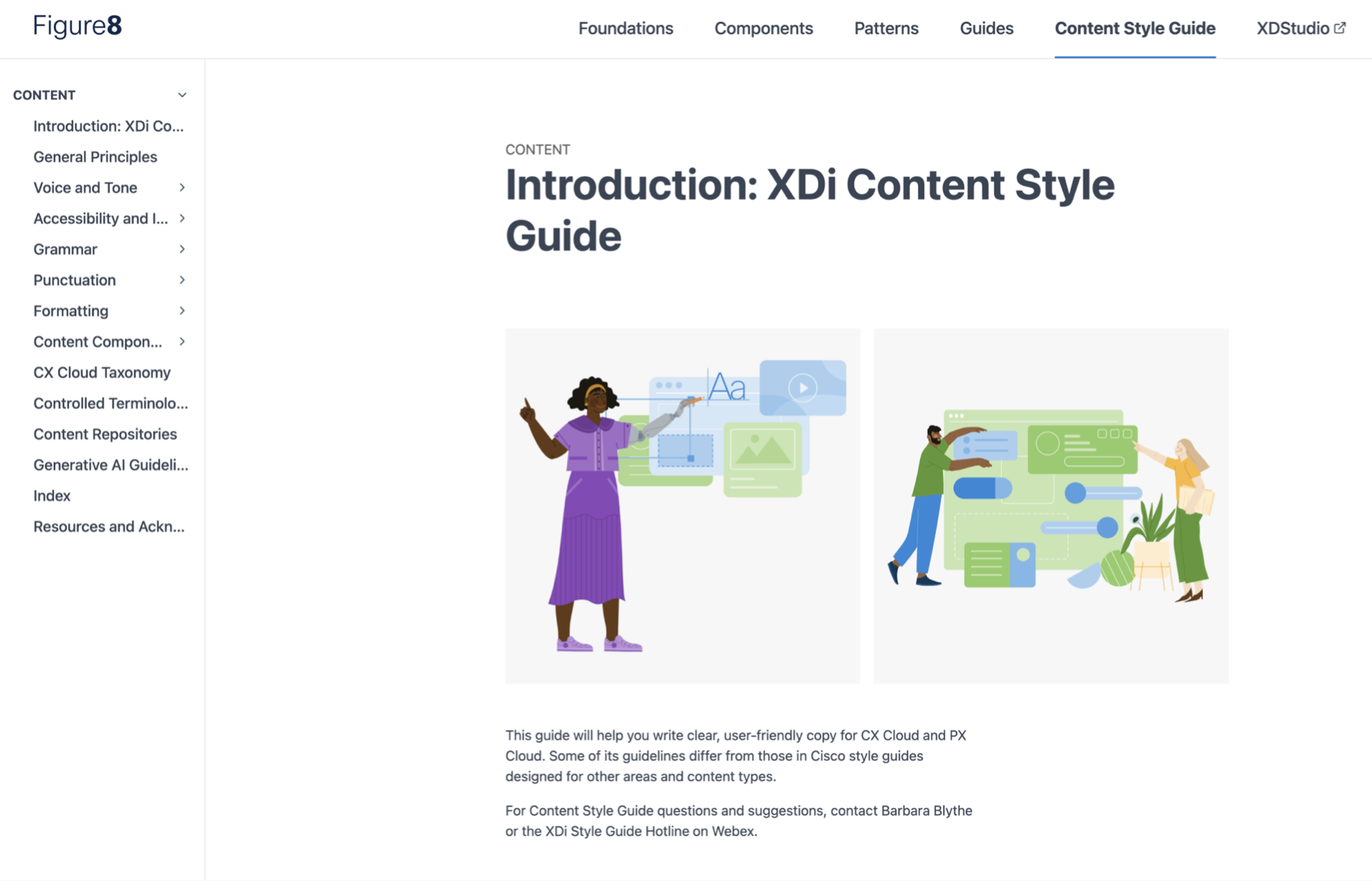
I led a project to create Cisco’s first content design system and then leveraged AI to increase adoption. It gave our team a set of shared standards and patterns that increased consistency, reduced duplicate efforts, and inspired similar projects in other Cisco orgs.
The context and the problem
Content designers and designers were repeatedly revisiting the same content decisions because patterns and guidance weren’t being documented in a reusable way. As inconsistencies began appearing across products, I proposed and secured approval to look into creating a content design system.
+ View more
The 10 content designers on my team working on Cisco’s CX Cloud and PX Cloud SaaS products were having trouble maintaining consistency due to the lack of content standards and patterns. They were also spending a lot of time researching and discussing content patterns and decisions, but decisions weren’t being captured, so the same topics ended up being litigated over and over. Leadership was identifying inconsistencies, and I noticed that they were coming up in CSAT results and research sessions as well. We had a small style guide, as did many other Cisco orgs, but we lacked comprehensive, actionable guidelines and modular patterns that would help us efficiently deliver consistent content at scale for our products.
I created a plan and a roadmap that helped secure approval from leadership for clearing my schedule to take on the project. They agreed that creating a content design system customized for our products would likely yield a high ROI in terms of saving designers time, preserving institutional knowledge, and promoting consistency across our experiences.
I began discovery by sharing a survey with the content design team and our product designers to determine determine what the perceived obstacles were to efficiently creating consistent content in our products.
Working toward a solution
Research revealed that th biggest opportunity wasn’t starting from scratch, but strategically expanding and and integrating existing resources. To reduce risk and build support, I proposed starting with an MVP content design system.
+ View more
Based on the survey results and some comparative research, I learned that the best ROI would come from expanding our current style guide in targeted ways, while also adding in component-specific patterns and a controlled terminology list. We also made a case to our design system that it would help make both the design system and the content design system more comprehensive and useful across product roles if they were integrated. To reduce risk and build support, I proposed an MVP system focused on demonstrating value and adoption before scaling further.
Process and execution
Defining IA and strategically expanding the existing style guide
I led a cross-functional effort to define the IA and strategy for the MVP content design system. Through stakeholder workshops and collaboration with the design system team, we established a scalable foundation for future growth and then started executing.
+ View more
I led a task force of content designers in defining the sections and tools that the content design system MVP would contain. We hosted discussions and card sorting exercises with stakeholders to align on the IA, and worked with the design system team to ensure that it would integrate seamlessly into their existing site.
Then we began updating and expanding the current style guide. I created Miro templates to use as we drafted entries, which allowed us to collaborate and iterate efficiently. For each entry we started by researching how that topic was approached in other style guides, how we tended to approach it in our products currently, and searching through team threads to see if we had made any decisions on it. We defined each set of guidelines in a way that addressed issues of relevance to our specific products, while keeping them as concise as possible. Where possible we included do’s and don’ts to facilitate quick decision-making and make the guidelines easier to interpret at a glance. We didn’t yet have broad access to LLMs while working on this project, but if we had, I would have been able to make this work much more efficient through the use of rapid drafting (see my use of rapid drafting in a more recent content design system project ).
Cisco already had an established voice, but I worked with my team to define a tonal range that reflected our particular products and the situations users might find themselves in while using them. For the Accessibility & Inclusion section, I researched and defined actionable accessibility and inclusivity standards that reflected Cisco’s commitment to powering an inclusive future for all.
Creating content components
I translated recurring content challenges into reusable guidelines, templates and component-specific patterns. By grounding the system in real product content and partnering with the design system team, we created resources teams could apply immediately.
+ View more
The next step was building out entries for content guidelines and templates related to specific patterns and components (like error messages, tooltips, and empty states).
I ran a voting exercise to see which patterns and components content designers and other UX folks thought it would be most useful to have content guidelines and templates for. Then we started building out entries with guidelines, do’s and don’ts, and links to Figma repositories that contained examples and templates. I was careful to maintain a flywheel between the content design system and the actual content my team had created in the product by identifying the best content patterns in the product and then abstracting and encoding them into components and templates. That helped us avoid getting too abstract and theoretical.
At this point I learned that the design system team had decided to audit their documentation (much of which was inconsistent, outdated, and poorly organized) and their components. I offered content support for that process, and seized the opportunity to enable the content design team to start collaborating with them going forward.
I updated their documentation and components to comply with our best practices and guidelines, added content guidelines where they didn’t yet exist, and added cross-links to the content design system so users could view more detailed content guidelines, templates, and repositories. Where relevant, I added Figma content variables into the components.
Creating a controlled terminology list
I led the creation of a controlled terminology program to improve clarity and consistency across our projects. The initiative included governance processes, user validation, and adoption efforts to ensure the terminology could scale.
+ View more
I then led a project to create a controlled terminology list containing the most important terms used in our products, to ensure that we’re using clear, accurate, consistent terminology.
To quickly create an MVP, I asked all the content designers to assemble lists including the 25 most important terms in their product areas, after which I collated the lists. I then worked on expanding the resulting list, led an initiative to get product designers using it, and put together a process for content designers to add to the list as they started on new features.
I also collaborated with our researchers to validate the most important terms with users. We designed and ran a study in which we tested a set of terms most in need of validation (as determined through discussions with content designers, design leads, and PMs). I marked the validated terms with green checkmarks and added summaries of relevant research results and links to studies. I also led a Cisco-wide event in which I showed other content design teams how to get started with terminology research.
Debuting the MVP, collecting data, and iterating
After launching the MVP I focused on driving adoption through enablement, feedback channels, and stakeholder engagement. Usage data and user feedback helped shape an ongoing roadmap of improvements and new content patterns.
+ View more
I debuted the MVP style guide to our design org and showed the product designers how it could make many design tasks easier. I also hosted a game that involved hunting for answers to style guide questions, to get everyone using it immediately in a fun context.
Then I debuted a style guide hotline channel, so anyone could get quick answers to style guide questions and offer feedback, and activated a thumbs up/down feature so users could indicate entries they found helpful or unhelpful. In response to feedback, I created a backlog of content design system update tickets and assigned them as content designers had capacity.
I also collaborated with the design system team to define a component taxonomy, since we realized from feedback that there was a lot of variety in the terms people were using to refer to components (and inconsistencies within the design system as well). I also added a hyperlinked index to the content style guide and ensured that alternate terms were included. Now no matter what someone might call a component (list? menu? dropdown? select?), they could easily find its guidelines.
After a couple months, I found (through Zeroheight analytics and surveying my colleagues) that adoption of the style guide materials was pretty good, but not as strong as we had hoped. Part of the reason was that product designers wanted a more exhaustive set of content guidelines and templates tailored specifically to the work they were doing.
I created an intake process, so product teams could request templates and content components, and also looked through my Figma comment threads (and encouraged other content designers to do the same) to identify patterns or templates that product designers often ask us about, or that we often point out. I also started keeping a log of questions received in the style guide hotline, and identified the most visited components in the site analytics. All of this data helped me create backlog items focused patterns and templates that were likely to get the most use.
Creating a style guide AI assistant
To make style guidance easier to access, I partnered with a conversation designer to create an AI-powered style guide assistant. It helped teams find relevant guidelines and patterns faster, while increasing adoption.
+ View more
It was about this time that LLMs were first coming onto the scene, and I worked with my team’s conversation designer to create a style guide assistant that could automate the process of consulting the style guide and provide links to relevant entries. We used VoiceFlow to build a RAG-based assistant, integrated with Cisco’s proprietary instance of ChatGPT.
The assistant was a big hit! Many design partners told us that it made it way easier to consult the style guide, and if they had any questions about the accuracy of the information provide, they could just follow the links the bot provided to the style guide entry in question.
I also collaborated with the conversation designer to create guidelines for using GenAI for creating product content. Several other design orgs expressed interest in adapting them for their own use.
Creating product taxonomy guides
I led the creation of product taxonomy guides that gave teams a shared understanding of key concepts and terminology. These resources improved consistency and helped new contributors get up to speed quickly.
+ View more
The next phase involved a project to design product taxonomy guides for the products we work. The goal was to ensure that everyone had a shared understanding of key terminology and concepts, promote consistency, and enable faster team member onboarding.
I led the project and worked with other content designers, as well as Product stakeholders. We created guides that gave a brief description of what each product area contained and the categories within it, displayed taxonomic relationships between objects in that area, explained important processes, and defined important terms and concepts.
Results and impact
I received a lot of positive feedback on the content design system from leadership and from my design partners.
+ View more
Common themes involved time saving, faster onboarding for new team members, increasing content and terminology consistency, and creating designs that received more positive user testing results in many cases.
Based on interest from content design teams in other Cisco orgs, I began offering learning sessions on how to create similar documentation, tools, and style guide AI assistants. These ad hoc meetings eventually turned into an ongoing series I hosted, called Content at Scale. I also shared these learnings with the global content design community through LinkedIn posts, blog articles, a conversation with Larry Swanson on his Podcast “Content Strategy Insights,” a Button talk, and a Button workshop.
For more on my cross-org knowledge sharing projects at Cisco see
Reflections & lessons learned
I learned some valuable lessons over the course of the project.
+ View more
Content enablement works best with a distributed model: Before I rolled off the project, I put processes in place that helped everyone on the content design team contribute to maintaining and expanding the system. For example, I created labels to clarify pattern status and encourage others to jump in and help close the discussion.
Content repositories are complicated to maintain: There’s a lot of complexity to ensuring that all the examples are up to date. It’s critical to define a maintenance process and schedule upfront.
The more integrated with the design system the better: The goal should be for content to be an integral part of the design system, rather than a separate content design system. For more see my blog post.
A different section layout
Defining IA and strategically expanding the existing style guide
This is the introductory text that is always visible to the user. It gives a brief overview of the topic before they decide to expand for more details.
Creating content components
I led a cross-functional effort to define the IA and strategy for the MVP content design system. Through stakeholder workshops and collaboration with the design system team, we established a scalable foundation for future growth and then started executing.
+ View more
I led a task force of content designers in defining the sections and tools that the content design system MVP would contain. We hosted discussions and card sorting exercises with stakeholders to align on the IA, and worked with the design system team to ensure that it would integrate seamlessly into their existing site.
Then we began updating and expanding the current style guide. I created Miro templates to use as we drafted entries, which allowed us to collaborate and iterate efficiently. For each entry we started by researching how that topic was approached in other style guides, how we tended to approach it in our products currently, and searching through team threads to see if we had made any decisions on it. We defined each set of guidelines in a way that addressed issues of relevance to our specific products, while keeping them as concise as possible. Where possible we included do’s and don’ts to facilitate quick decision-making and make the guidelines easier to interpret at a glance. We didn’t yet have broad access to LLMs while working on this project, but if we had, I would have been able to make this work much more efficient through the use of rapid drafting (see my use of rapid drafting in a more recent content design system project ).
Cisco already had an established voice, but I worked with my team to define a tonal range that reflected our particular products and the situations users might find themselves in while using them. For the Accessibility & Inclusion section, I researched and defined actionable accessibility and inclusivity standards that reflected Cisco’s commitment to powering an inclusive future for all.
Creating a controlled terminology list
I led a cross-functional effort to define the IA and strategy for the MVP content design system. Through stakeholder workshops and collaboration with the design system team, we established a scalable foundation for future growth and then started executing.
+ View more
I led a task force of content designers in defining the sections and tools that the content design system MVP would contain. We hosted discussions and card sorting exercises with stakeholders to align on the IA, and worked with the design system team to ensure that it would integrate seamlessly into their existing site.
Then we began updating and expanding the current style guide. I created Miro templates to use as we drafted entries, which allowed us to collaborate and iterate efficiently. For each entry we started by researching how that topic was approached in other style guides, how we tended to approach it in our products currently, and searching through team threads to see if we had made any decisions on it. We defined each set of guidelines in a way that addressed issues of relevance to our specific products, while keeping them as concise as possible. Where possible we included do’s and don’ts to facilitate quick decision-making and make the guidelines easier to interpret at a glance. We didn’t yet have broad access to LLMs while working on this project, but if we had, I would have been able to make this work much more efficient through the use of rapid drafting (see my use of rapid drafting in a more recent content design system project ).
Cisco already had an established voice, but I worked with my team to define a tonal range that reflected our particular products and the situations users might find themselves in while using them. For the Accessibility & Inclusion section, I researched and defined actionable accessibility and inclusivity standards that reflected Cisco’s commitment to powering an inclusive future for all.